What Does Collate Mean When Printing? A Complete Guide for UK Businesses
September 18, 2026
When ordering printed materials, you may come across options like collate, uncollated, or collated printing. For many people, these terms are confusing because they are part of printing industry language rather than everyday communication.
So, what does collate mean when printing?
In simple terms, collating means arranging printed pages or documents into the correct order before they are delivered. Instead of receiving separate piles of pages that need manual sorting, collated printing provides complete sets that are ready to use. For example, if you print a 10-page company brochure with 100 copies, a collated print order will organise every brochure as:
- Copy 1: Page 1 → Page 2 → Page 3 → Continue until Page 10
- Copy 2: Page 1 → Page 2 → Page 3 → Continue until Page 10
This small printing feature can save businesses valuable time, especially when producing large quantities of brochures, reports, catalogues, manuals, and marketing materials. For UK businesses, understanding printing terms like collating helps ensure you choose the right service and receive documents prepared exactly how you need them.
What Is the Meaning of Collate in Printing?
The meaning of collate in printing refers to the process of gathering and arranging individual printed pages into complete sets. Modern printers and commercial printing machines can automatically collate documents during production. This means each finished copy is organised correctly without requiring someone to manually arrange pages afterward. For example, imagine printing a 5-page product guide:
- Without collating: Page 1 × 500 copies | Page 2 × 500 copies | Page 3 × 500 copies | Page 4 × 500 copies | Page 5 × 500 copies
- With collating: Complete Guide 1: Pages 1–5 | Complete Guide 2: Pages 1–5 | Complete Guide 3: Pages 1–5
The result is a professional, ready-to-distribute document. Collated printing is commonly used for:
- Business reports
- Product catalogues
- Training manuals
- Company brochures
- Presentation documents
- Packaging information sheets
For businesses that sell physical products, organised printed materials can also support a better customer experience. For example, packaging inserts, product guides, and instruction sheets can be prepared as complete sets alongside professional product packaging and custom packaging solutions.
Collated vs Uncollated Printing: Key Differences
The difference between collated and uncollated printing mainly comes down to how pages are arranged after printing.
| Feature |
Collated Printing |
Uncollated Printing |
| Page Arrangement |
Pages are arranged into complete sets |
Pages are grouped separately |
| Readiness |
Ready for immediate distribution |
Requires manual sorting |
| Best For |
Best for multi-page documents |
Useful for separate page requirements |
| Efficiency |
Saves preparation time |
May be useful for specific workflows |
Collated Printing
Collated printing is ideal when each recipient needs a complete document. Examples include:
- Business proposals
- Event brochures
- Training documents
- Product catalogues
- Instruction manuals
The printer automatically organises pages so each copy is complete and ready to hand over.
Uncollated Printing
Uncollated printing means pages are printed separately in groups. For example, a 3-page document printed 100 times may come as:
- 100 copies of page one
- 100 copies of page two
- 100 copies of page three
This option can be useful when pages need separate handling, sorting, or different distribution methods.
Why Is Collating Important in Printing?
Collating may seem like a small printing feature, but it can make a major difference when handling large print orders. Without proper page arrangement, businesses may spend extra time sorting documents manually before they can be distributed. For companies producing professional materials, collated printing improves efficiency, reduces preparation work, and creates a better presentation for customers, employees, or business partners.
Some key benefits include:
Saves Time
One of the biggest advantages of collated printing is that documents arrive already organised. Instead of spending hours arranging hundreds of pages manually, businesses can immediately use their printed materials. This is especially useful for:
- Training manuals
- Corporate reports
- Product guides
- Sales presentations
- Event documents
For example, a company preparing product information sheets can receive complete document sets ready to include with orders. This works well alongside professional packaging inserts, where organised printed materials improve the overall customer experience.
Creates a Professional Presentation
The way printed materials are presented can influence how customers view a business. A properly collated brochure, catalogue, or company document looks more professional because recipients receive a complete and organised copy. Businesses commonly use collated printing for:
- Product catalogues
- Marketing brochures
- Company profiles
- Instruction guides
- Proposal documents
The same attention to detail applies to physical product presentation. Companies investing in custom printed boxes and retail packaging often use organised printed materials to maintain a consistent brand experience.
Reduces Manual Sorting
For large print quantities, manual sorting can become time-consuming and increase the chance of mistakes. Collating removes this extra step by allowing printing equipment to arrange pages automatically.
This is particularly useful for:
- Large business meetings
- Training sessions
- Customer documentation
- Educational materials
- Marketing campaigns
When documents are ready to distribute, teams can focus on their main tasks instead of preparing printed materials.
Examples of Collated Printing
Collated printing is used across many industries because businesses often need multiple-page materials prepared in a ready-to-use format.
Business Documents
Companies frequently use collated printing for important business materials, including:
- Annual reports
- Business proposals
- Presentations
- Financial documents
- Employee handbooks
When documents contain multiple sections, having pages correctly arranged saves time and creates a more organised impression.
Marketing Materials
Marketing campaigns often require printed materials that are easy to distribute. Examples include:
- Product catalogues
- Service brochures
- Brand presentations
- Promotional booklets
For businesses selling physical products, printed marketing materials often work alongside branded packaging. For example, companies may combine product catalogues with product packaging and custom boxes to create a complete brand experience.
Product Documentation and Packaging Materials
Many businesses use collated printing for documents that support their products. Examples include:
- Assembly instructions
- Product guides
- Care instructions
- Warranty documents
- Packaging inserts
For e-commerce and retail brands, organised documentation helps customers understand products after purchase. This is especially important for companies using custom packaging solutions, where printed inserts and branded materials become part of the unboxing experience.
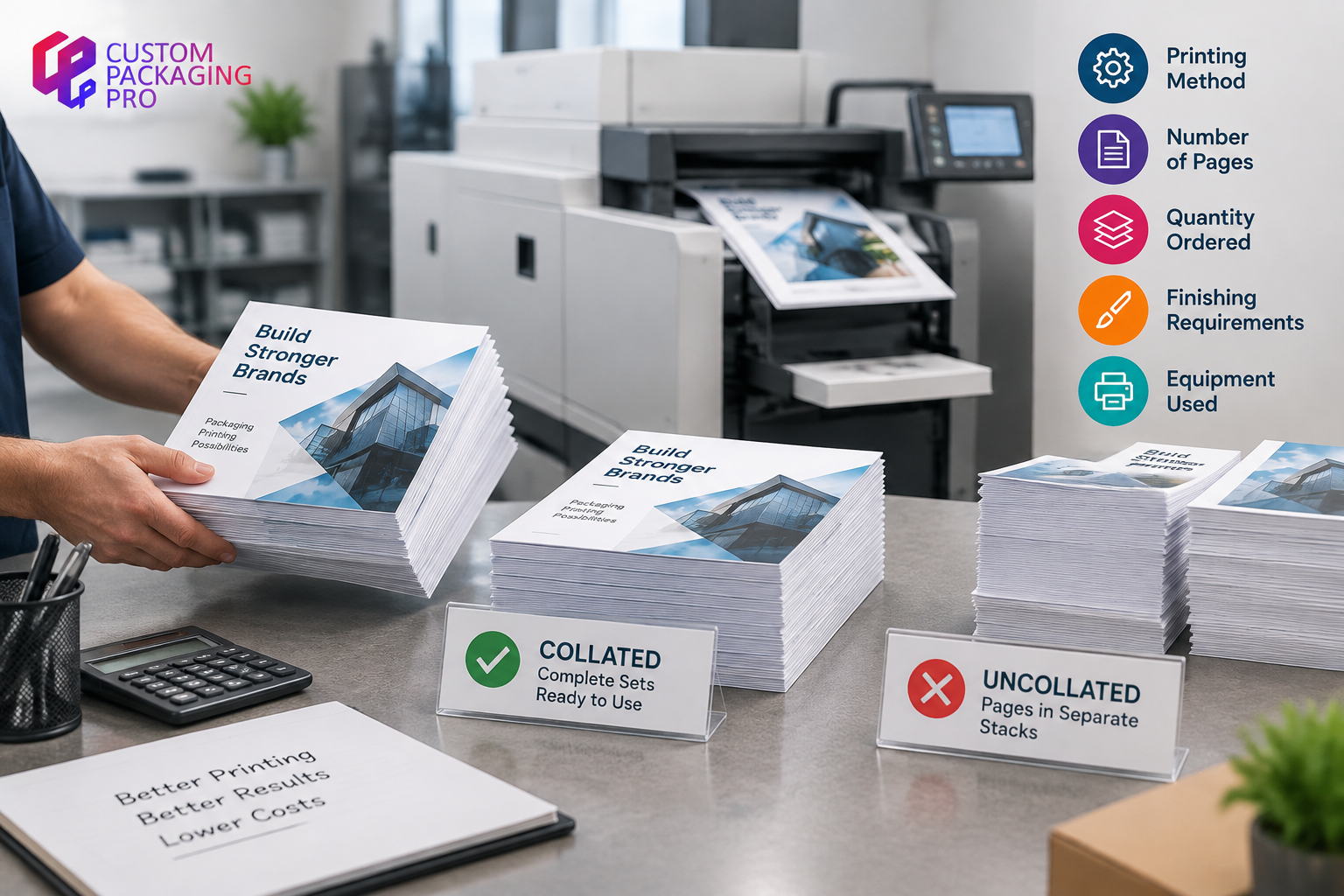
Does Collating Affect Printing Cost?
Many businesses wonder whether choosing collated printing increases the overall cost. In most cases, the difference depends on:
- Printing method
- Number of pages
- Quantity ordered
- Finishing requirements
- Equipment used
For digital printing, automatic collating is often a standard feature included with many professional printing services. For larger commercial printing projects, additional finishing requirements may affect pricing. However, the time saved through automatic organisation can often make collated printing a practical choice for businesses handling large document orders.
Pairing well-organised documents with sturdy cardboard boxes ensures your entire document batch remains protected and professionally presented during transit.
When Should You Choose Collated Printing?
Collated printing is usually the better choice when you need complete document sets that are ready to distribute. Choose collated printing for:
- Multi-page brochures
- Training manuals
- Product catalogues
- Business reports
- Presentation documents
- Customer information packs
If every recipient needs the same complete set of pages, collating makes the process faster and more efficient.
When Should You Choose Uncollated Printing?
While collated printing is useful for complete document sets, there are situations where uncollated printing is the better option. Uncollated printing works well when pages need to be handled separately, grouped later, or used for different purposes. You may choose uncollated printing for:
- Single-page flyers
- Forms and paperwork
- Separate marketing sheets
- Documents requiring manual sorting
- Projects where pages are distributed individually
For example, a business printing different promotional sheets for multiple products may prefer uncollated printing because each page can be distributed separately. However, for customer-facing materials such as catalogues, instruction manuals, and product guides, collated printing usually provides a smoother experience.
How Does Automatic Collating Work?
Modern printing technology has made collating much easier. Many digital printers and commercial printing machines include automatic collating features that arrange pages without manual assistance. The process usually works like this:
- The printer receives the complete document file.
- The machine prints each page in the required quantity.
- Internal finishing systems organise pages into complete sets.
- The finished documents are ready for binding, packaging, or distribution.
Commercial printers often combine collating with other finishing options, including:
- Stapling
- Folding
- Binding
- Cutting
- Booklet creation
These finishing processes are especially useful for businesses producing professional marketing materials, product guides, and printed documentation. High-end presentation materials often pair seamlessly with premium rigid boxes to create a luxury unboxing feel for client proposals and corporate kits.
Collating in Commercial Printing for Businesses
Businesses across different industries use collated printing to create organised, professional materials. Some common examples include:
Product Catalogues
Retail and manufacturing companies often print multi-page catalogues that showcase products, specifications, and pricing information. A collated catalogue ensures customers receive every section in the correct order. This works especially well for companies that combine printed marketing materials with professional packaging and branded product presentation.
Training and Instruction Materials
Companies often provide employees or customers with guides that contain multiple pages. Examples include:
- Training manuals
- User guides
- Safety instructions
- Product information documents
Collated printing makes these resources easier to read and distribute.
Packaging Inserts and Product Information
Many brands include printed materials inside product packages. Examples include:
- Care instructions
- Assembly guides
- Product details
- Promotional cards
When combined with well-designed counter display boxes, collated promotional inserts and instruction sheets can easily attract customer attention in retail stores while maintaining perfect sequence.
Collated Printing and Packaging Presentation
Although collating is mainly associated with documents, the same idea of organisation applies to packaging. A well-presented product experience includes more than just the outer box. Customers also interact with:
- Product cards
- Instructions
- Brand information
- Promotional materials
- Care guides
Businesses looking for eco-friendly presentation often pair organized insert cards with sustainable kraft boxes to pay attention to every detail inside the package. A complete and organised presentation can improve customer satisfaction and strengthen brand perception.
Final Thoughts
So, what does collate mean when printing? Collating means arranging printed pages into the correct order so each copy is complete and ready to use. For businesses printing brochures, catalogues, reports, manuals, and product documents, collated printing saves time and creates a more professional result. Uncollated printing still has its place when pages need separate handling or later organisation, but collated printing is usually the better choice when each recipient needs a complete document set.
Understanding the difference between collated and uncollated printing helps businesses choose the right printing option for their needs and create a smoother experience for customers, employees, and partners.
Frequently Asked Questions About Collated Printing
What does collate mean on a printer?
Collate means the printer arranges multiple pages into complete sets. For example, a three-page document printed five times will be organised as five complete copies instead of five separate groups of each page.
What is the meaning of collate in printing?
In printing, collating refers to arranging pages or printed materials in the correct sequence before they are delivered or distributed. It is commonly used for brochures, reports, manuals, and other multi-page documents.
What is the difference between collated and uncollated printing?
Collated printing creates complete document sets with pages arranged in order. Uncollated printing groups identical pages together and may require manual sorting afterward.
Should I choose collated printing?
Choose collated printing when you need ready-to-use copies of multi-page documents. It is useful for:
- Reports
- Brochures
- Manuals
- Product guides
- Presentations
Does collating cost more?
The cost depends on the printing service, document size, quantity, and finishing requirements. For many digital printing projects, automatic collating is included as part of the printing process.
What type of documents should be collated?
Documents that usually benefit from collating include:
- Business reports
- Product catalogues
- Training manuals
- Brochures
- Instruction guides
- Presentation documents